Jev is an AI model for the small judgments inside software: which category an item belongs in, how well it meets a rule, or whether a statement is likely true. TypeSafe AI introduced it in an announcement dated September 15, 2026, calling it its first “System One” model.
The appeal is easy to understand. If an app needs to sort thousands of messages, waiting for a conversational answer each time can be wasteful. Jev is designed to return decisions that the app can use directly.
Jev looks interesting for fast, narrowly defined decisions. Its speed and cost claims deserve a closer look. A guarantee about the shape of an answer does not guarantee the answer is right.
What does Jev actually do?
Imagine an app that sorts incoming notes. A note says, “Compare the memory requirements of two local models.” You give Jev three possible categories: learning, shopping, and scheduling. It returns a choice and probabilities for the options. Your app decides what to do next.
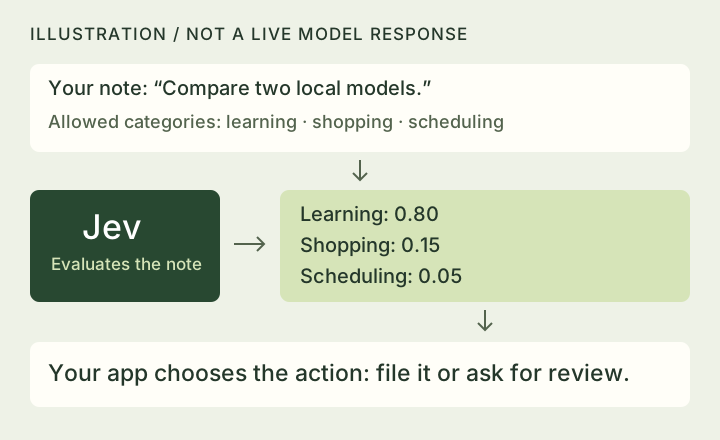
TypeSafe’s documentation describes three question types: Choice picks from your options; Score rates something against a scale you define; Noul estimates whether a statement is true, on a 0–1 scale. Several independent questions can be evaluated together.
“Typed” means the permitted answer format is specified ahead of time. For a category question, software can expect a category instead of a paragraph that somebody has to interpret.
Why the attention?
TypeSafe’s homepage advertises 193.6× faster and 444.6× cheaper performance on its selected workflow comparisons. Those are company-reported results for particular tasks and settings, not a universal advantage over every language model.
The listed price, checked September 17, is $0.042 per million input tokens, with no output-token charge. At that rate, one million requests of exactly 1,000 billable input tokens each would cost $42 for model input. That is an illustrative calculation, not the total cost of running an app.
There are attention-grabbing demos, too. TypeSafe shows Jev playing Doom, but explains that the demo supplies structured game-state information, rather than screenshots. Its current documentation lists text input, with no image, audio, or video input. The demo should not be read as proof of visual game understanding.
What does “zero hallucinations” mean here?
TypeSafe’s launch explanation grounds its zero figure in guaranteed schema matching: the output follows the allowed structure. It explicitly says that figure is not an empirical error measurement.
In our note-sorting example, Jev could obey the rules by selecting “shopping” and still misunderstand the note. That would be a valid category and a bad decision. A type-safe output prevents one kind of software failure; it does not settle factual correctness.
This is also why “regular LLMs only return messy text” is too broad. Providers already offer constrained structured outputs. For example, Claude’s documentation describes schema-constrained responses and their limitations. The useful comparison is decision quality, uncertainty, speed, and total cost on the same work.
Does a confidence score mean it knows?
TypeSafe says its training targets calibrated decisions. Calibration describes how predicted probabilities line up with outcomes across many examples. As a simple illustration, predictions assigned an 80% probability should be correct about eight times out of ten in a well-calibrated group. That cannot certify one particular answer. TypeSafe makes this distinction too.
There is another wrinkle: Jev’s confidence field is a summary of how concentrated the option probabilities are. It is not simply a direct percentage chance that the selected answer is correct. Choice and Score have this field; Noul does not. The confidence guide explains the difference.
For a real app, check these signals against examples you have labeled yourself before deciding when to act automatically.
How strong is the evidence so far?
The published workflow evaluation covers four areas, including invoice processing and customer service. It compares results with reference answers generated by other large models, rather than treating a human-verified answer set as ground truth. It also assumes the surrounding workflow code is correct.
That is useful evidence about performance in that particular setup. Agreement with other models, however, is not the same as proving a real-world decision correct. TypeSafe also acknowledges that its headline gains may be near the high end of what users see, and that its comparison wrapper adds overhead to the LLMs.
We have not independently benchmarked Jev. This article explains the launch, documentation, and published methodology. It does not establish that Jev matches a named frontier model across general tasks.
Where would I try it?
My first experiment would be something easy to inspect and undo: tagging saved articles as news, tutorials, or opinion. I would keep a separate set of labeled examples, include ambiguous entries, and compare mistakes, response time, and cost against a simple rule-based approach and a small language model.
Jev does not write an article, generate code, or explain its reasoning in prose. A system could use it to sort a request, then pass that request to another model for writing. That division of work is a more useful starting point than asking whether it replaces a chatbot.
The documented way to try TypeSafe’s Jev itself is through its hosted playground or API. TypeSafe had not announced downloadable Jev weights in the official material reviewed. Access and pricing can change.
Can I run a Jev-style decision model on my own computer?
Yes. Some other decision models can now run locally in llama.cpp, software for using downloaded models. Its new /v1/systemone endpoint accepts the Jev-style request format: a situation and the choices to score. This does not mean TypeSafe has released Jev’s own model weights.
Suppose you want to sort saved receipts into groceries, travel, or other. You could send those choices and each receipt to TypeSafe’s hosted Jev service, or run a supported open model on your computer. Either way, check a set of receipts you have labeled yourself before letting the app file them automatically. An allowed answer can still be the wrong answer.
The llama.cpp team initially listed five compatible open models, including small text-only models and an image-capable model called OpenJev. Its published speed figures were measured on an NVIDIA RTX PRO 6000, so they are not a speed estimate for your Mac. Model size, quantization, and your hardware will affect memory use and response time. Start with the team’s quick start and our short news brief; treat this as a hands-on option to evaluate, not a verified recommendation for a particular machine.
The promising idea is making small AI judgments cheap and quick enough to use throughout an app. The next question is how reliably those judgments hold up on your own messy inputs. That is worth testing, even without accepting the biggest launch claims.
Sources & editorial notes
Reviewed October 3, 2026. Primary sources are linked alongside the claims they support. Performance figures are TypeSafe’s claims, not avoid.works measurements. The note-sorting example and diagrams are original illustrations. Local model performance has not been measured by avoid.works.
- TypeSafe launch announcement and benchmark caveats ↗
- TypeSafe’s workflow evaluation methodology ↗
- TypeSafe’s interface and question types ↗
- Probability and confidence explained by TypeSafe ↗
- Current model versions and pricing ↗
- Anthropic’s structured-output documentation ↗
- llama.cpp team: open decision models and measured setup ↗
- Merged llama.cpp implementation ↗